
10 Editable AI Prompts for Roblox Thumbnail Generation
Create Roblox gaming thumbnails with 10 detailed, editable AI image prompts. Customize the avatar, setting, action, and colors for obbies, horror escapes, pet reveals, tycoons, races, and more. Each prompt includes clear composition instructions, space for a headline, and suggested text to add afterward. Includes written prompts; finished images are generated separately.
What this prompt pack does
- Guides your AI image tool to create 10 distinct Roblox-style thumbnail scenes with clear subjects, expressive poses, and purposeful lighting.
- Lets you personalize bracketed details to match your avatar, gameplay, video topic, and channel colors.
- Plans space for readable headlines and provides a suggested headline for every thumbnail concept.
Tips for this prompt pack
- Use a screenshot of your avatar or gameplay as a reference when supported, and choose a scene that reflects something viewers will see in the video.
- Add a short headline in an image editor after generation; use large letters with strong contrast and keep them away from faces and important objects.
- Preview the thumbnail at phone size. If the idea is unclear, simplify the background or ask the tool to make the main subject larger.
How to use the prompts
- Choose one prompt and replace each bracketed example with your own avatar, setting, challenge, or feature.
- Paste the edited prompt into your AI image tool, attach optional references, select 16:9 if available, and generate the artwork.
- Adjust the result, add your headline, and export at 1280 × 720 pixels for a YouTube thumbnail using an image editor.
10 AI Thumbnail Generator Prompts I Editable Templates
10 Roblox Thumbnail Generator Prompts You Can Customize
Replace the bracketed examples before using each prompt. If your image tool accepts references, upload your Roblox avatar screenshot and add: “Use the attached avatar as the character reference; preserve its outfit, colors, accessories, and blocky proportions.”
Generate the artwork first, then add your headline in an image editor.
10 AI Thumbnail Prompts You Can Copy and Customize
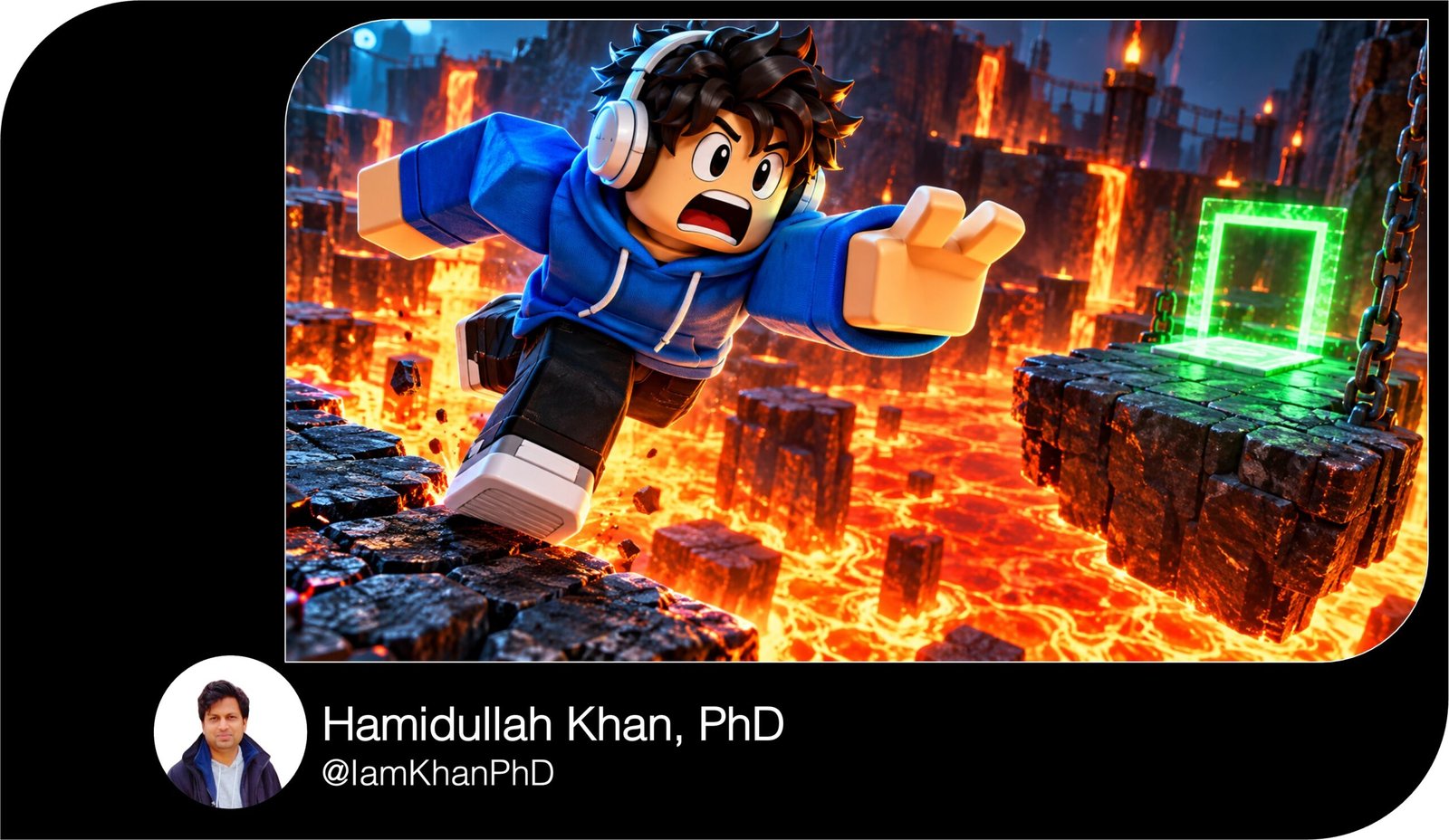
1. Lava Obby: One Jump from Disaster
Create a horizontal 16:9 Roblox-style gaming thumbnail for a video about [OBBY: Lava Tower]. Show [AVATAR: a blocky character wearing a blue hoodie, black pants, and white headphones] jumping from a cracked platform toward [GOAL: a glowing green checkpoint].
Place the avatar large on the right half, turned toward the viewer with a frightened expression, arms spread and feet visibly above the lava. A broken platform falls into bright orange lava underneath. Make the checkpoint visible in the middle distance, with only three platforms leading toward it.
Use a low camera angle, orange light from below, and a cool blue outline around the avatar so it stands out. Keep the face and jump sharp; soften distant obstacles. Leave the upper-left quarter dark and uncluttered for a headline. Use clean blocky 3D forms. No text, interface, watermark, or extra characters.
10 Custom AI Thumbnail Generator Prompts
2. Horror Escape: Something Is Behind You
Create a horizontal 16:9 Roblox-style horror thumbnail set inside [LOCATION: an abandoned hotel corridor]. Place [AVATAR: a blocky character in a yellow jacket and black cap] in the left foreground, looking back over one shoulder with wide eyes while holding a flashlight.
Show [THREAT: a tall shadow creature with glowing red eyes] at the far end of the corridor on the right, clearly separated from the avatar. Angle the flashlight beam toward a half-open door between them.
Use cold blue corridor lighting, a warm flashlight beam, and a small red glow around the creature. Keep the avatar’s face readable and the creature’s silhouette recognizable. Add light mist close to the floor without hiding either subject. Leave the upper-center area simple for a headline. Make the scene suspenseful and suitable for a general gaming audience, without gore. No lettering, game interface, or watermark.
10 Thumbnail Prompt Extractors I Editable AI Prompt Pack
3. Pet Reveal: The Moment the Egg Opens
Create a horizontal 16:9 Roblox-style thumbnail showing a pet reveal from [GAME OR SERIES: my pet-hatching challenge]. Put one large cracked [EGG: purple crystal egg] in the center foreground.
Show [PET: a small golden dragon with turquoise wings] emerging from it, fully recognizable, with its face and wings unobstructed. Place [AVATAR: a blocky character wearing a pink hoodie and round glasses] on the right, leaning toward the pet with a delighted expression and raised hands.
Use a purple background with a soft golden burst behind the pet, a few floating sparkles, and bright reflections on the eggshell. Limit background scenery to two blurred egg pedestals. Make the pet the brightest object and the avatar the second focal point. Leave the top-left area clear for a headline. No invented rarity percentages, currency counters, lettering, interface, or watermark.
AI Thumbnail Maker Prompts: 10 Editable Templates
4. Tycoon Transformation: Tiny Starter to Huge Build
Create a horizontal 16:9 Roblox-style before-and-after thumbnail for [TYCOON THEME: a futuristic factory]. Divide the image into two clear halves with a glowing diagonal boundary.
On the left, show [STARTER BUILD: one small conveyor, a wooden shed, and two crates] under muted daylight. On the right, show [FINISHED BUILD: a three-story neon factory with glass walls and giant production machines] under bright blue-and-gold lighting. Use the same ground-level camera angle on both halves so the improvement is easy to understand.
Place one large [AVATAR: a blocky character in a red jacket and black headphones] at the bottom center, facing the larger build and gesturing toward it. Keep both buildings visible behind the character. Reserve a clean strip across the top for a headline. No money amounts, interface panels, text, watermarks, or duplicate avatars.
10 YouTube Thumbnail Generator Prompts I Editable AI Templates
5. Secret Discovery: The Hidden Door
Create a horizontal 16:9 Roblox-style thumbnail for a video revealing [SECRET: a hidden treasure room] in [SETTING: a mountain adventure map].
Place [AVATAR: a blocky explorer wearing a green jacket and tan backpack] in the left foreground, pointing toward a slightly open stone door on the right. Make the door blend into the cliff, with its edges now visible and warm golden light spilling through the opening. Show only a glimpse of [REWARD: a glowing crystal on a pedestal] inside to create curiosity.
Use cool gray rock, green foliage, and warm light around the doorway. Frame the avatar and door tightly enough that both are recognizable at a small size. Include one thick red arrow pointing to the door, without covering it. Leave the upper-left corner clear for a headline. No invented map labels, lettering, interface, or watermark.
10 Free Thumbnail Prompts You Can Copy & Edit
6. Underdog Battle: Tiny Player, Giant Boss
Create a horizontal 16:9 Roblox-style action thumbnail for [CHALLENGE: defeating the stone boss with a starter sword].
Place [AVATAR: a blocky beginner character in a plain blue shirt] in the left foreground, gripping [WEAPON: a short wooden sword] with a determined expression. Put [BOSS: a huge stone golem with glowing orange cracks] on the right, several times taller than the avatar.
Keep both faces visible, with an open gap between them so their size difference is obvious. Show the boss raising one fist and the avatar preparing to dodge. Use a rocky arena, a few airborne stones, orange light around the boss, and blue edge lighting on the avatar. Keep motion streaks away from faces. Leave the top-center area clear for a headline. Use dramatic blocky 3D rendering. No health bars, damage numbers, lettering, watermark, or extra fighters.
10 Best Thumbnail Prompts for Content Creators
7. Speedrun Challenge: Racing to the Finish
Create a horizontal 16:9 Roblox-style thumbnail for [CHALLENGE: finishing a rooftop obby before time runs out].
Show [AVATAR: a blocky character in a white tracksuit and red shoes] sprinting from the left foreground toward [FINISH: a glowing green finish gate] on the right. Angle the camera slightly above the course so one final gap and the finish gate are both visible. Give the avatar a focused expression, a forward lean, and a clearly readable running pose.
Use blue sky, bright yellow platforms, and red accents near the last obstacle. Add short motion streaks behind the avatar while keeping the face and finish gate sharp. Leave a clean dark rectangle in the upper-left corner for a timer added later, plus open space above the finish for a headline. Do not generate timer digits, text, interface elements, extra avatars, or watermarks.
YouTube Gaming Thumbnail Prompt Pack: 10 Editable Designs
8. Update Reveal: First Look at a New Feature
Create a horizontal 16:9 Roblox-style thumbnail introducing [ACTUAL NEW FEATURE: a floating sky island] from [GAME: my adventure game].
Make the feature fill the center and right of the image: show [FEATURE DETAILS: a grassy island with a crystal tower, waterfalls, and a rope bridge]. Place [AVATAR: a blocky character wearing a purple jacket and silver headphones] large in the lower-left foreground, looking up with an excited expression and pointing toward the island.
Use a camera angle below the island to emphasize its height. Choose a turquoise sky, purple shadows, and warm sunlight along the island’s edges. Keep the crystal tower clearly visible and simplify distant scenery. Leave the top-left area clear for a headline. Match any supplied gameplay reference for the feature’s design. No invented update badges, dates, logos, lettering, interface, or watermark.
10 ChatGPT YouTube Thumbnail Prompts I Editable Pack
9. Racing Showdown: Side by Side at the Finish
Create a horizontal 16:9 Roblox-style racing thumbnail featuring [MY CAR: a red sports car with black stripes] and [RIVAL CAR: a blue racing car with a white spoiler].
Put the red car large in the lower-left foreground and the blue car slightly farther back on the right, racing toward the same finish line. Show [AVATAR: a blocky driver wearing a black helmet] visibly seated in the red car, keeping the character’s proportions consistent with the vehicle.
Use a low trackside camera angle, a sweeping asphalt curve, blurred stands, and a black-and-white finish banner in the distance. Keep both cars sharp, with tire smoke and motion streaks trailing behind them. Use warm sunset light and bright reflections on the car bodies. Leave the upper-left sky clear for a headline. No real car badges, sponsor logos, lettering, interface, or watermark.
10 Roblox Studio Thumbnail Prompts You Can Copy and Customize
10. Funny Fail: The Jump That Went Wrong
Create a horizontal 16:9 Roblox-style comedy thumbnail showing [FAIL: missing an easy jump and landing headfirst in a giant cake].
Place [AVATAR: a blocky character wearing a green hoodie and oversized sunglasses] in the center-right, with legs sticking upward and the face still visible above the frosting. Show the tiny missed platform behind the cake so viewers can understand the mistake. Add exactly one [FRIEND: a blocky character in a yellow shirt] on the left, laughing and pointing toward the cake.
Use bright pink frosting, a turquoise background, and warm yellow highlights. Freeze the splash of frosting into a few large readable shapes. Keep the scene playful, with no injury or distress. Leave the upper-left area clear for a headline. Maintain clean blocky anatomy and recognizable outfits. No speech bubbles, lettering, interface, watermark, or extra characters.

About author







Add comment