
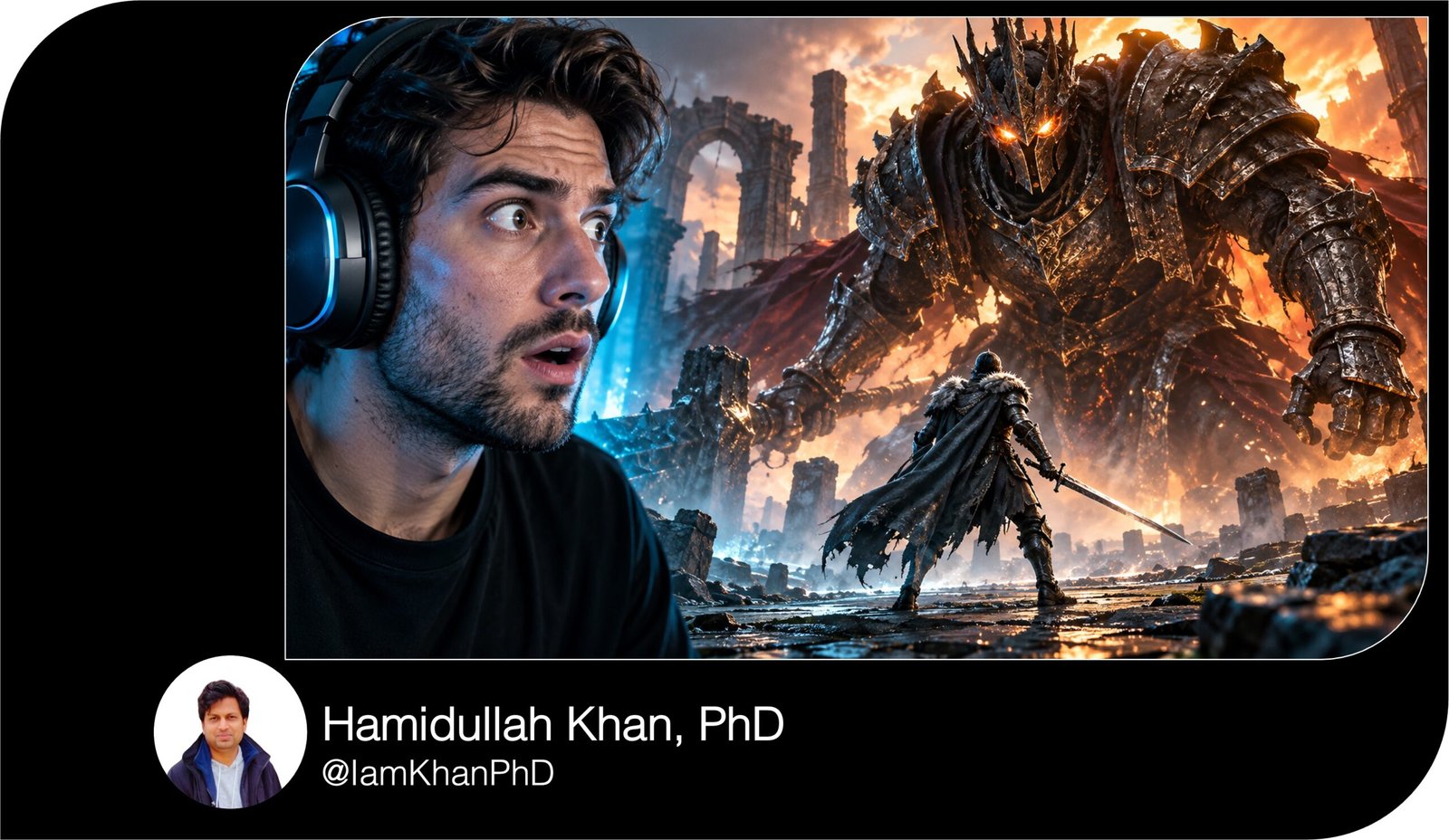
10 AI Thumbnail Prompts for YouTube Gaming I Editable Pack
Create eye-catching gaming thumbnail concepts with 10 detailed, editable AI prompts. Customize the game, characters, scene, colors, and headline to suit your video—from clutch wins and horror moments to epic builds, funny fails, and speedruns.
What this prompt pack does
- Provides 10 distinct thumbnail setups for common gaming video formats.
- Guides the AI on subject placement, lighting, colors, background, and headline space.
- Lets you personalize each concept using editable fields and optional reference images.
Tips for this prompt pack
- Choose a moment, item, or challenge that actually appears in your video.
- Upload a clear gameplay screenshot or character image when your tool supports references.
- Keep headlines short; if AI-generated lettering looks wrong, add the text afterward in your preferred editor.
How to use the prompt pack
- Pick the prompt that matches your video and replace every bracketed field with your details.
- Paste the edited prompt into an AI image tool and select landscape 16:9; use 1280 × 720 pixels if available.
- Generate a few variations, choose the clearest design, and check that the subject and headline remain readable at small size.
10 Editable AI Thumbnail Prompts for YouTube Gaming
Replace every [bracketed field] with your own details before using a prompt. The examples inside the brackets show what to enter. If your AI tool supports image uploads, attach a gameplay screenshot, character reference, or photo of yourself for a more personalized result.
1. Battle Royale — Last-Second Clutch
Create a YouTube gaming thumbnail in landscape 16:9 format for [GAME NAME: Fortnite]. The video features [CLUTCH MOMENT: winning the final fight with almost no health].
Place [MAIN CHARACTER: my uploaded in-game character] in the left foreground, shown from the waist up, aiming toward one clearly visible opponent on the right. Use a low camera angle to make the confrontation feel intense. Add [SETTING: a ruined rooftop] behind them, with a glowing storm closing in from the distance.
Use electric blue lighting around the main character and orange lighting around the opponent. Keep the weapon, hands, and character silhouette clean and recognizable. Blur background details slightly so the fight remains the focus.
Leave clear space in the upper-right corner for “[HEADLINE: 1 HP CLUTCH].” Keep important elements away from the bottom-right timestamp area. Use no extra characters, tiny interface details, logos, watermarks, or graphic gore.
2. Building Game — Epic Base Reveal
Create a landscape 16:9 YouTube thumbnail for a [GAME NAME: Minecraft] building video showcasing [BUILD: a giant mountain castle with waterfalls].
Make the completed build fill the center and right two-thirds of the image. Use a three-quarter aerial view that clearly shows its entrance, height, and most impressive feature: [KEY DETAIL: a glowing bridge connecting two towers]. Preserve the game’s recognizable block-based appearance.
Place [AVATAR: my uploaded player skin] in the lower-left foreground, pointing toward the build. Keep the avatar large enough to recognize without covering the castle. Use warm sunset lighting, a soft pink sky, and illuminated windows to separate the structure from the landscape.
Leave a clean area in the upper-left for “[HEADLINE: I BUILT THIS!].” Avoid unrelated buildings, excessive particles, unreadable signs, or extra text. Keep the bottom-right corner visually simple.
3. Horror Game — Something Behind You
Create a cinematic 16:9 YouTube thumbnail for [HORROR GAME: Phasmophobia], based on [VIDEO MOMENT: discovering a ghost standing behind the player].
Place [SUBJECT: my uploaded face photo, or a fictional adult gamer] on the left, with wide eyes and a visibly startled expression. Show the head and shoulders clearly. On the right, place one [THREAT: shadowy ghost with pale glowing eyes] at the far end of [LOCATION: an abandoned hospital corridor].
Use a flashlight beam to connect the foreground subject with the distant threat. Light the face with cold blue light and add a restrained red glow behind the ghost. Keep the image dark and atmospheric while making both faces readable at small size.
Reserve the upper-center area for “[HEADLINE: BEHIND YOU!].” Use suspense rather than blood or gore. Avoid multiple monsters, pitch-black faces, busy interface elements, and watermarks.
4. Racing Game — Impossible Overtake
Create a dynamic 16:9 gaming thumbnail for [RACING GAME: Forza Horizon] showing [VIDEO MOMENT: a close overtake on a rain-soaked mountain bend].
Place [PLAYER CAR: a bright yellow sports car] prominently in the lower-left foreground, angled toward the center. Position [RIVAL CAR: a dark blue supercar] slightly behind it on the right. Show a narrow but believable gap between the cars, with no accidental collision unless the video includes one.
Use a low roadside camera angle. Add wet-road reflections, light tire spray, and directional motion blur in the scenery. Keep both cars sharp, with realistic wheel placement and undistorted bodywork.
Use cool blue surroundings so the yellow car stands out. Leave clean sky space at the upper-left for “[HEADLINE: LAST CORNER!].” Avoid unrelated vehicles, excessive smoke, invented brand badges, tiny speedometer graphics, and watermarks.
5. Gaming Challenge — One Weapon Only
Create a bold 16:9 YouTube thumbnail for a challenge video in [GAME NAME: your game]. The challenge is [RULE: win using only the starter pistol].
Make [CHALLENGE ITEM: the starter pistol] the main visual, enlarged in the center-left with accurate proportions and a bright outline. Place [PLAYER CHARACTER: my uploaded character] behind it on the right, looking determined. Show [RELEVANT OBSTACLE: a heavily armored enemy] farther back, large enough to communicate the difficulty without competing with the item.
Use a dark, simplified version of [LOCATION: the game’s arena] as the background. Light the challenge item in yellow and the obstacle in red. The image should immediately communicate “small weapon, difficult challenge.”
Leave upper-right space for “[HEADLINE: PISTOL ONLY].” Do not include other usable weapons, unrelated rewards, or a victory scene unless the video actually shows a win. Keep the composition uncluttered and watermark-free.
6. Loot Reveal — Rare Item Discovery
Create a 16:9 YouTube gaming thumbnail for [GAME NAME: your game] featuring the discovery of [ITEM: a rare glowing sword].
Use [ITEM REFERENCE: my uploaded screenshot of the actual item] as the visual reference when provided. Place one open [CONTAINER: treasure chest] in the lower center, with the item floating clearly above it. Make the item large enough that its shape and distinctive details remain visible on a phone screen.
Position [SUBJECT: my uploaded face photo, or a fictional adult gamer] on the left, reacting with surprise and looking directly toward the item. Use [RARITY COLOR: purple] light from the chest to illuminate the subject and nearby surroundings. Keep the background dark and softly blurred.
Reserve the upper-right for “[HEADLINE: FINALLY FOUND!].” Avoid additional loot, invented rarity percentages, fake drop rates, or duplicate items. Make the reveal exciting while accurately representing what appears in the video.
7. Boss Battle — Tiny Hero, Giant Enemy
Create an epic landscape 16:9 YouTube thumbnail for [GAME NAME: Elden Ring] featuring a battle against [BOSS NAME OR DESCRIPTION: a towering armored knight].
Place the player character in the lower-left foreground, facing the boss with [EQUIPMENT: a sword and shield]. Make the boss occupy the center and right side, clearly larger than the player, with its face or helmet visible. Use a low viewpoint to emphasize the difference in scale.
Set the scene in [ARENA: a ruined cathedral courtyard]. Light the player with cool blue highlights and the boss with warm gold or red light. Add a small amount of dust and sparks around the point of confrontation, keeping both silhouettes distinct.
Leave uncluttered space in the upper-left for “[HEADLINE: FINAL ATTEMPT].” Use accurate character references when available. Avoid extra enemies, excessive particles, overlapping limbs, fake health bars, and graphic gore.
8. Funny Gaming Fail — One Second Before Disaster
Create a humorous 16:9 YouTube thumbnail for [GAME NAME: Fall Guys] showing [FAIL MOMENT: my character slipping off the final platform].
Place [PLAYER CHARACTER: my uploaded character] large in the center, frozen mid-fall with an exaggerated but game-appropriate pose. Show the edge of [OBSTACLE: a bright pink moving platform] immediately above or beside the character so the cause of the failure is obvious.
Add one [SECONDARY DETAIL: another player safely standing on the platform] in the background. Keep that detail smaller than the falling character. Use a tilted camera angle, vivid candy colors, and simple motion lines to emphasize the mistake without clutter.
If a face photo is provided, include a small reaction cutout in the left corner with a laughing or shocked expression. Reserve upper-right space for “[HEADLINE: SO CLOSE!].” Avoid extra reaction faces, unrelated props, tiny captions, and watermarks.
9. Gaming Comparison — Which One Wins?
Create a clean 16:9 YouTube thumbnail comparing [OPTION A: Weapon A] with [OPTION B: Weapon B] in [GAME NAME: your game].
Divide the image into two equal halves using a clear diagonal separator. Place Option A on the left against a cool blue background and Option B on the right against a warm orange background. Show both subjects at a similar visual size, using matching camera angles and equally strong lighting.
Use uploaded screenshots as references when available, preserving each option’s distinctive shape, color, and details. Keep the backgrounds simple, with a subtle game-related texture. Add one small “VS” at the center if the image tool can render it clearly.
Reserve space above each subject for “[LEFT LABEL: SPEED]” and “[RIGHT LABEL: POWER].” Make the comparison feel balanced. Avoid winner badges, invented statistics, or visual claims that are not supported by the video. Include no watermarks or unrelated objects.
10. Speedrun — Racing Against the Clock
Create a high-energy 16:9 YouTube thumbnail for a speedrun of [GAME NAME: your game], featuring [KEY SECTION: the final jump before the finish].
Place [PLAYER CHARACTER: my uploaded avatar] in the center-left, moving toward [GOAL: a glowing finish portal] on the right. Use strong directional lighting and background motion blur to guide the viewer’s eye from the character to the goal. Keep the character and landing area sharp.
Use [COLOR PALETTE: cyan, black, and bright yellow] for clear contrast. Leave a large, clean area in the upper-left for “[HEADLINE: UNDER 10 MIN?].” If the video includes a verified completion time, reserve a second small area for “[ACTUAL TIME: 09:42].” Otherwise, omit the time.
Keep the route understandable with only one important obstacle visible. Avoid multiple clocks, fake record badges, misleading completion times, tiny interface details, and watermarks.


About author






Add comment