
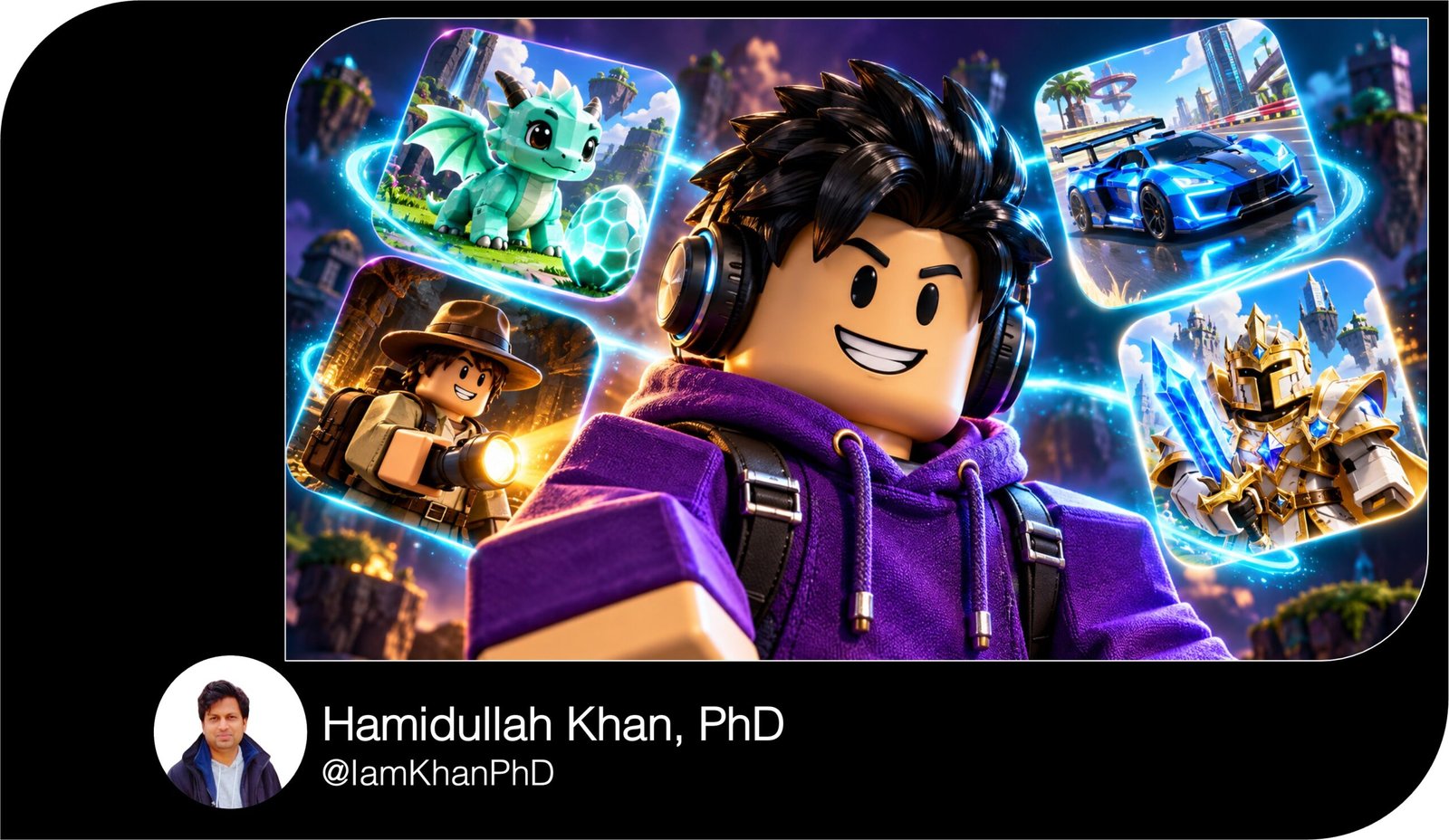
10 Roblox AI Icon Generator Prompts I Editable Prompt Pack
Create distinctive Roblox-style icons with 10 detailed, editable AI image prompts. Customize avatars, outfits, pets, colors, and game themes using simple bracketed fields. Ideal for beginners creating gaming profile images, game concept icons, and social media visuals. Includes prompt text; images are generated separately in your chosen AI image tool.
What This Prompt Pack Does
- Provides 10 distinct icon concepts, including avatars, obbies, pets, tycoons, racing, and fantasy adventures.
- Guides the AI’s composition, lighting, colors, and focal points to produce clearer gaming icons.
- Lets you personalize each design by replacing easy-to-find bracketed details.
Tips for This Prompt
- Choose one main character or object and two or three dominant colors for a recognizable icon.
- If your image tool accepts references, attach your avatar image and ask it to preserve the outfit, hairstyle, and accessories.
- Check the result at a small size; if important details disappear, request a closer crop or a simpler background.
How to Use the Prompt
- Choose a prompt and replace every bracketed example with your preferred character, theme, and colors.
- Paste the completed prompt into your AI image tool and select a square image format if available.
- Generate the image, then refine one detail at a time—for example, “make the face larger” or “remove the background sparkles.”
10 Roblox AI Icon Generator Prompts
Create eye-catching Roblox-style icons for gaming profiles, game concepts, and social media branding with these 10 editable AI image prompts.
Before you start: Replace the text inside [square brackets] with your own details. Each prompt creates a square icon designed to remain recognizable at small sizes.
1. Personalized Roblox Avatar Portrait
Prompt:
Create a square gaming profile icon featuring a Roblox-style avatar with a block-shaped head, rectangular body, and recognizable toy-like proportions. Give the avatar [HAIRSTYLE: short spiky black hair], [EXPRESSION: a confident smile], and [OUTFIT: a purple hoodie with black headphones]. Add one signature accessory: [ACCESSORY: oversized blue sunglasses]. Frame the character from the chest upward, facing slightly toward the viewer, with the face occupying the central half of the image. Use polished 3D rendering, smooth plastic-like materials, and soft studio lighting. Place the avatar against a simple [BACKGROUND COLOR: bright turquoise] background with a subtle circular glow behind the head. Keep the hairstyle, face, and accessory clearly separated. Leave space around the head for circular profile cropping. Avoid text, watermarks, extra characters, and realistic human anatomy.
2. Rainbow Obby Adventure Icon
Prompt:
Create a square Roblox-style obstacle-course game icon showing one [AVATAR: cheerful blocky character wearing an orange tracksuit] jumping between floating platforms above [HAZARD: glowing pink lava]. Capture the character mid-jump in the foreground, with bent blocky legs and arms extended for balance. Arrange three large platforms diagonally into the background to suggest an exciting route. Use [PLATFORM COLORS: yellow, cyan, and purple], with one simple [OBSTACLE: rotating striped beam] farther behind the avatar. Render everything as bright, polished 3D game artwork with clear shapes and playful lighting. Make the avatar the main focal point and keep the lava visually secondary. Use strong color separation so the character remains readable as a small icon. Avoid tiny platforms, crowded obstacle layouts, text, logos, and additional avatars.
3. Pet Collector Game Icon
Prompt:
Design a square Roblox-style pet collector icon centered on one original [PET: round mint-green dragon] with [FEATURES: tiny gold horns, short wings, and a star-shaped tail tip]. Give the pet oversized friendly eyes and a happy expression. Position it beside one [SPECIAL OBJECT: glowing lavender egg] that is slightly smaller than the pet. Use chunky, toy-like geometry, smooth 3D surfaces, and soft highlights. Place both subjects on a simple circular pedestal against a [BACKGROUND: pastel peach gradient]. Add only three small floating sparkles around the egg to suggest a special discovery. Make the pet’s face and distinctive silhouette readable at thumbnail size. Keep the color palette limited to mint, lavender, peach, and gold. Avoid extra pets, excessive particles, written rarity labels, watermarks, and copied characters from existing games.
4. Business Tycoon Game Icon
Prompt:
Generate a square Roblox-style tycoon game icon featuring a confident [AVATAR: blocky entrepreneur in a navy suit and gold tie] holding one oversized [BUSINESS OBJECT: shiny gold coin]. Position the avatar in the foreground, slightly left of center, with a proud smile. Behind the character, show a simplified [BUSINESS: two-story burger restaurant] with a bold roof shape and one recognizable [DETAIL: giant burger-shaped roof decoration]. Use a low viewing angle to make the character and building feel successful and impressive. Apply polished 3D game rendering, warm sunlight, and a [COLOR PALETTE: navy, gold, and red]. Keep the building’s windows and entrance simple. The face and coin should attract attention first. Avoid money piles, unreadable signs, real brand names, text, and crowded city scenery.
5. Spooky Survival Game Icon
Prompt:
Create a square Roblox-style spooky survival icon featuring one [AVATAR: blocky explorer wearing a yellow raincoat] holding a [LIGHT SOURCE: small glowing flashlight]. Frame the explorer from the waist upward in the foreground, with a startled expression and the flashlight aimed toward the lower-right corner. Behind the avatar, place one original [CREATURE: tall shadow figure with two round violet eyes] partly hidden in a [SETTING: abandoned hallway]. Use cool [BACKGROUND COLORS: deep blue and charcoal] contrasted with warm flashlight illumination. Keep the avatar’s face clearly visible despite the dark atmosphere. Render in stylized 3D with simple environmental shapes and a strong silhouette for the creature. Make the mood suspenseful and suitable for a broad gaming audience. Avoid gore, graphic injuries, excessive darkness, additional monsters, text, and watermarks.
6. Fantasy Warrior Icon
Prompt:
Design a square Roblox-style fantasy combat icon featuring one original [HERO: blocky knight with silver armor and a red cape]. Give the hero [FACE EXPRESSION: determined eyebrows and a confident grin] and [HAIRSTYLE: short white hair]. Show the character from the waist upward, holding one oversized [WEAPON: glowing blue crystal sword] diagonally beside the body without covering the face. Place a simple [BACKGROUND SYMBOL: golden circular magical ring] behind the character against a [BACKGROUND COLOR: deep violet] backdrop. Use polished 3D game art, chunky armor shapes, clean beveled edges, and blue rim lighting along the sword-facing side. Keep the armor details large and readable. Make the face and sword the two visual priorities. Avoid additional weapons, elaborate battle scenes, tiny magical symbols, text, and existing franchise characters.
7. Racing Game Icon
Prompt:
Create a square Roblox-style racing game icon featuring one [VEHICLE: chunky electric-blue sports car] with [CUSTOM DETAILS: orange wheel rims and a white center stripe]. Show the car from a low front three-quarter angle, pointing toward the lower-left corner, with the entire vehicle inside the frame. Include one visible [DRIVER: smiling blocky avatar wearing a white racing helmet] seated behind the windshield. Place the car on a simplified [TRACK: curved neon-lit raceway] with two broad track lines leading into the background. Use polished toy-like 3D materials, bright reflections, and a [BACKGROUND COLOR: dark purple] sky. Add restrained motion streaks behind the car while keeping its body sharp. Make the car recognizable at small sizes. Avoid real manufacturer logos, other vehicles, smoke covering the wheels, text, and excessive blur.
8. Space Explorer Icon
Prompt:
Generate a square Roblox-style space adventure icon featuring one [AVATAR: blocky astronaut in a white spacesuit with orange panels]. Use a clear helmet visor so the avatar’s [EXPRESSION: excited smile] remains visible. Frame the astronaut from the chest upward, positioned slightly right of center, holding one [OBJECT: glowing cyan energy crystal] near the lower-left part of the image. Behind the character, show one large [PLANET: purple planet with a thin golden ring] against a simple deep-navy starfield. Use polished 3D rendering with soft suit textures, cool helmet reflections, and cyan light reflecting from the crystal onto the gloves. Limit the stars to a few small points. Maintain clear separation between helmet, planet, and background. Avoid crowded spacecraft, complex control panels, unreadable suit labels, extra astronauts, and watermarks.
9. Cozy Roleplay Icon
Prompt:
Create a square Roblox-style cozy roleplay icon showing one [AVATAR: friendly blocky character with brown pigtails] wearing [OUTFIT: a cream sweater and green overalls]. Position the character from the waist upward, holding one oversized [OBJECT: pink strawberry milkshake] beside the chest. Behind the avatar, include a simplified [LOCATION: pastel neighborhood café] with a striped awning and one large window. Use a [COLOR PALETTE: cream, blush pink, and sage green], warm afternoon lighting, and soft 3D toy-like materials. Give the avatar a relaxed smile and a welcoming posture. Keep the café slightly softer and smaller than the character so the face remains the focal point. Leave breathing room around the hair and shoulders. Avoid busy street scenes, multiple food items, tiny decorations, readable signs, text, and extra characters.
10. Mining Simulator Icon
Prompt:
Design a square Roblox-style mining simulator icon featuring one [AVATAR: blocky miner wearing a red helmet and denim overalls] holding a [TOOL: chunky silver pickaxe with a blue handle]. Show the miner from the waist upward, with the pickaxe resting over one shoulder and the face fully visible. In the lower foreground, place one oversized [RESOURCE: glowing emerald crystal] emerging from a simple dark rock. Use a [SETTING: stylized cave entrance] with only two broad rock formations framing the character. Apply polished 3D game rendering, warm helmet light, and green illumination from the crystal. Make the miner’s face, pickaxe, and crystal easy to distinguish. Use bold shapes with minimal surface detail. Avoid piles of small gems, complex cave tunnels, extra tools, written level indicators, logos, and watermarks.


About author







Add comment