

How I Made a LinkedIn-Ready Visual Resume with One ChatGPT Prompt
I turned a simple headshot into a full LinkedIn-style personal brand infographic in under 2 minutes.
No designer.
No Canva.
No Photoshop.
Just ChatGPT + one prompt.
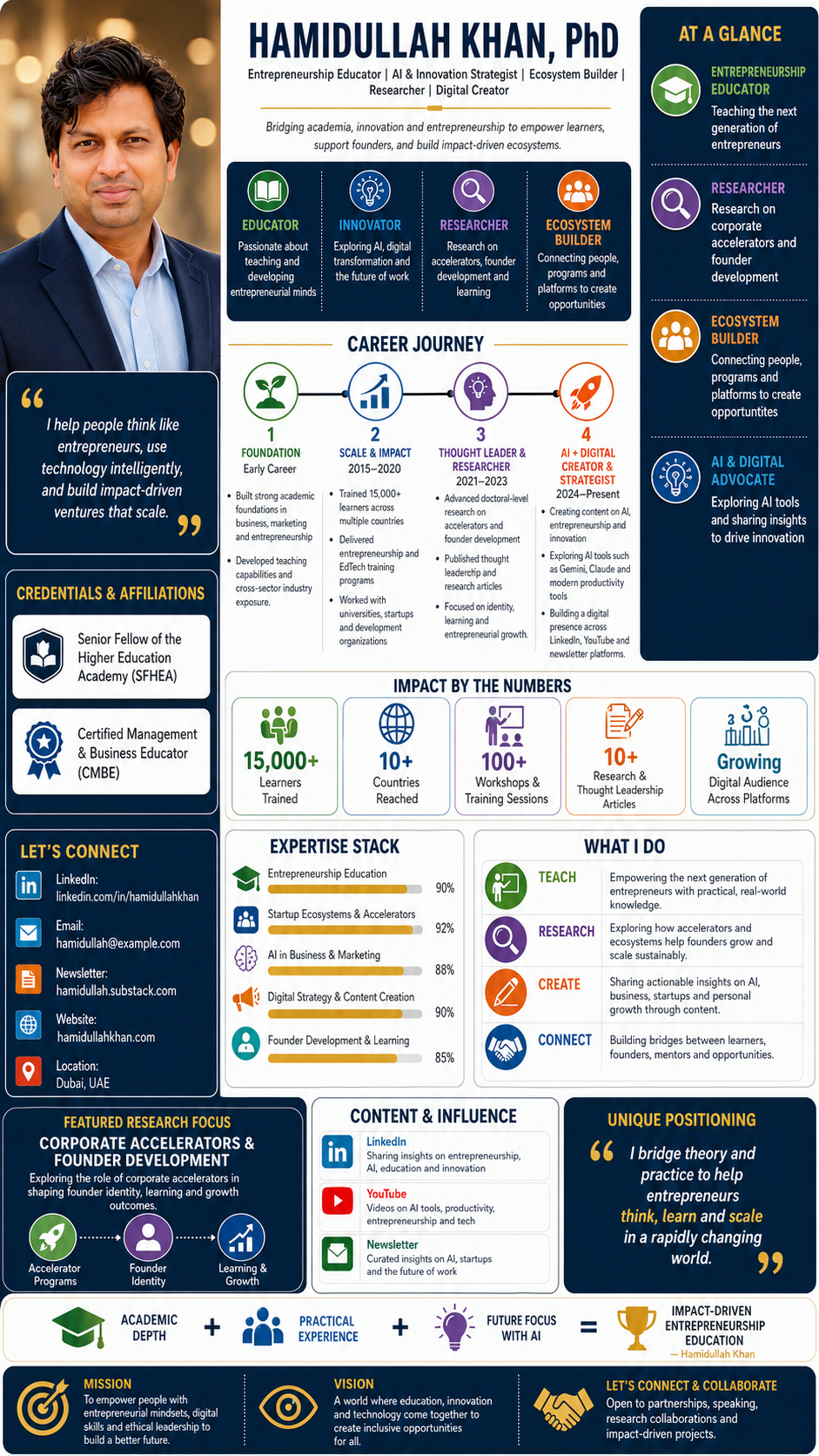
Here’s the workflow:
Upload your professional photo to ChatGPT
Ask it to create a “9:16 personal-brand infographic poster”
Add your name, title, expertise, journey, metrics, and contact info
Tell it to preserve your facial identity and use your photo as the left-side portrait
Generate the image
Edit small text/details if needed
For best results, upload your own professional headshot and tell the image generator: “Use the uploaded photo as the portrait on the left side while preserving the person’s facial identity, clothing style, and professional look.”
Prompt structure to copy:
Create a tall vertical professional personal-brand infographic poster in a modern corporate style, inspired by a LinkedIn personal profile one-page visual resume.
Canvas & Format
- Vertical poster, 9:16 aspect ratio
- High-resolution, sharp, clean, professional
- Suitable for LinkedIn, portfolio, speaker profile, personal website, and digital media
- Balanced infographic layout with multiple sections, icons, timeline, metrics, and personal branding elements
Overall Style
- Premium business infographic design
- Modern entrepreneurship and innovation theme
- Clean white background with dark navy panels
- Accent colors: gold/yellow, teal, green, purple, orange, and blue
- Rounded cards, subtle shadows, thin dividers, elegant spacing
- Professional yet creative layout
- Use clean sans-serif typography
- Make all text crisp, readable, and editable-looking
- Use icon-based visual storytelling
Main Person / Portrait Section
On the left side, place a high-quality professional portrait of:
[INSERT PERSON DESCRIPTION OR USE UPLOADED PHOTO]
Portrait style:
- Confident professional headshot
- Smart black blazer or business-casual outfit
- Warm studio lighting
- Soft blurred background with golden bokeh
- Polished, modern, entrepreneurial look
- Person facing slightly toward camera
- Realistic, high-quality, premium profile-photo style
Under the portrait, add a dark navy quote card with large gold quotation marks.
Quote text:
“[INSERT PERSONAL QUOTE]”
Example:
“I help people think like entrepreneurs, use technology intelligently, and build impact-driven ventures that scale.”
Header Section
At the top center, add a large bold name:
[INSERT FULL NAME]
Example:
ASIF IQBAL
Under the name, add professional title lines separated by vertical bars:
[ROLE 1] | [ROLE 2] | [ROLE 3] | [ROLE 4]
Example:
Entrepreneurship Educator | AI & Innovation Strategist
Ecosystem Builder | Researcher | Digital Creator
Add a short positioning statement below:
[INSERT POSITIONING STATEMENT]
Example:
Bridging academia, innovation and entrepreneurship to empower learners, support founders and build impact-driven ecosystems.
Core Identity Cards
Create a horizontal dark navy card row with four sections, each with a colorful icon and short text.
Card 1:
Icon: graduation cap
Title: EDUCATOR
Text: [INSERT EDUCATOR DESCRIPTION]
Card 2:
Icon: rocket
Title: INNOVATOR
Text: [INSERT INNOVATOR DESCRIPTION]
Card 3:
Icon: analytics or research chart
Title: RESEARCHER
Text: [INSERT RESEARCH DESCRIPTION]
Card 4:
Icon: community or people
Title: ECOSYSTEM BUILDER
Text: [INSERT ECOSYSTEM DESCRIPTION]
Example texts:
- Passionate about teaching and developing entrepreneurial minds
- Exploring AI, digital transformation and the future of work
- PhD research on corporate accelerators and founder development
- Connecting people, programs and platforms to create opportunities
Right Sidebar: “At a Glance”
Create a dark navy vertical panel on the right titled:
AT A GLANCE
Include four stacked sections with circular colorful icons:
- ENTREPRENEURSHIP EDUCATOR
Teaching the next generation of entrepreneurs - RESEARCHER
PhD research on corporate accelerators and founder development - ECOSYSTEM BUILDER
Connecting people, programs and platforms to create opportunities - AI & DIGITAL ADVOCATE
Exploring AI tools and sharing insights to drive innovation
Use dotted divider lines between sections.
Credentials & Affiliations Section
On the lower-left sidebar, create a section titled:
CREDENTIALS & AFFILIATIONS
Add two credential blocks with logos or simple placeholder badges:
Credential 1:
[INSERT CREDENTIAL / ORGANIZATION]
Example:
Senior Fellow of the Higher Education Academy
SFHEA
Advance HE
Credential 2:
[INSERT CREDENTIAL / ORGANIZATION]
Example:
Certified Management & Business Educator
CMBE
Chartered Association of Business Schools
Contact Section
Add a “LET’S CONNECT” section with icons for LinkedIn, email, newsletter, link page, and location.
Include:
LinkedIn: [INSERT LINKEDIN URL]
Email: [INSERT EMAIL]
Newsletter: [INSERT NEWSLETTER URL]
Links: [INSERT LINKTREE / WEBSITE]
Location: [INSERT CITY, COUNTRY]
Career Journey Timeline
Create a large central section titled:
CAREER JOURNEY
Use a horizontal timeline with four phases, each represented by a large circular icon and a colored timeline line.
Phase 1:
Title: FOUNDATION
Subtitle: Early Career
Icon: plant / seedling
Bullets:
- [INSERT BULLET 1]
- [INSERT BULLET 2]
- [INSERT BULLET 3]
Phase 2:
Title: SCALE & IMPACT
Years: [INSERT YEARS]
Icon: growth chart
Bullets:
- [INSERT BULLET 1]
- [INSERT BULLET 2]
- [INSERT BULLET 3]
Phase 3:
Title: THOUGHT LEADER & RESEARCHER
Years: [INSERT YEARS]
Icon: head with lightbulb
Bullets:
- [INSERT BULLET 1]
- [INSERT BULLET 2]
- [INSERT BULLET 3]
Phase 4:
Title: AI + DIGITAL CREATOR & STRATEGIST
Years: [INSERT YEARS]
Icon: rocket
Bullets:
- [INSERT BULLET 1]
- [INSERT BULLET 2]
- [INSERT BULLET 3]
Example bullets:
Phase 1:
- Built strong academic foundation in business, marketing and entrepreneurship
- Developed teaching capabilities and industry exposure across diverse sectors
Phase 2:
- Trained 15,000+ learners across multiple countries
- Delivered entrepreneurship and EdTech training programs
- Worked with universities, startups and development organizations
Phase 3:
- Pursuing PhD research on corporate accelerators and founder development
- Published research and thought leadership articles
- Focus on identity, learning and growth of entrepreneurs
Phase 4:
- Creating content on AI, entrepreneurship and innovation
- Exploring AI tools like Gemini, Claude and more
- Building digital presence on LinkedIn, Substack, YouTube and beyond
Impact Metrics Section
Create a section titled:
IMPACT BY THE NUMBERS
Use five statistic cards with icons:
- [NUMBER]+
Learners Trained - [NUMBER]+
Countries Reached - [NUMBER]+
Workshops & Training Sessions - [NUMBER]+
Research & Thought Leadership Articles - [STATUS]
Digital Audience Across Platforms
Example:
15,000+ Learners Trained
10+ Countries Reached
100+ Workshops & Training Sessions
10+ Research & Thought Leadership Articles
Growing Digital Audience Across Platforms
Expertise Stack
Create a right-side section titled:
EXPERTISE STACK
Use five horizontal skill bars with small icons and gold endpoints.
Skills:
- Entrepreneurship Education
- Startup Ecosystems & Accelerators
- AI in Business & Marketing
- Digital Strategy & Content Creation
- Founder Development & Learning
Skill bar levels should look strong but varied, around 80–95%.
What I Do Section
Create a card titled:
WHAT I DO
Use four rows with colored circular icons:
TEACH
[INSERT TEACH DESCRIPTION]
RESEARCH
[INSERT RESEARCH DESCRIPTION]
CREATE
[INSERT CREATE DESCRIPTION]
CONNECT
[INSERT CONNECT DESCRIPTION]
Example:
TEACH
Empowering the next generation of entrepreneurs with practical, real-world knowledge.
RESEARCH
Exploring how accelerators and ecosystems help founders grow and scale sustainably.
CREATE
Sharing actionable insights on AI, business, startups and personal growth through content.
CONNECT
Building bridges between learners, founders, mentors and opportunities.
Featured Research Focus Section
Create a dark navy central card titled:
FEATURED RESEARCH FOCUS
Main title:
[INSERT RESEARCH TOPIC]
Example:
CORPORATE ACCELERATORS & FOUNDER DEVELOPMENT
Subtitle:
[INSERT RESEARCH SUMMARY]
Example:
Exploring the role of corporate accelerators in shaping founder identity, learning and growth outcomes.
Add three simple icons at the bottom:
- Accelerator Programs
- Founder Identity
- Learning & Growth
Use small arrows or dotted lines connecting the icons.
Content & Influence Section
Create a card titled:
CONTENT & INFLUENCE
Include three platform rows with icons:
LinkedIn
[INSERT LINKEDIN CONTENT DESCRIPTION]
YouTube
[INSERT YOUTUBE CONTENT DESCRIPTION]
Substack / Newsletter
[INSERT NEWSLETTER CONTENT DESCRIPTION]
Example:
LinkedIn — Sharing insights on entrepreneurship, AI, education and innovation
YouTube — Videos on AI tools, productivity, entrepreneurship and tech
Substack — Curated insights on AI, startups and the future of work
Unique Positioning Section
Create a dark navy quote-style card titled:
UNIQUE POSITIONING
Text:
[INSERT UNIQUE POSITIONING STATEMENT]
Example:
I bridge theory and practice to help entrepreneurs think, learn and scale in a rapidly changing world.
Highlight keywords in gold, such as “think,” “learn,” and “scale.”
Formula / Value Proposition Section
Create a visual equation near the bottom:
ACADEMIC DEPTH
Research-backed knowledge
PRACTICAL EXPERIENCE
Real-world teaching and training
FUTURE FOCUS WITH AI
Leveraging technology to create impact
=
IMPACT-DRIVEN ENTREPRENEURSHIP EDUCATION
— [INSERT NAME]
Use icons:
- graduation cap
- people/community
- lightbulb
- trophy
Bottom Footer
Create three dark navy footer panels:
MISSION
[INSERT MISSION STATEMENT]
VISION
[INSERT VISION STATEMENT]
LET’S CONNECT & COLLABORATE
[INSERT COLLABORATION MESSAGE]
Example:
MISSION
To empower people with entrepreneurial mindsets, digital skills and ethical leadership to build a better future.
VISION
A world where education, innovation and technology come together to create inclusive opportunities for all.
LET’S CONNECT & COLLABORATE
Open to partnerships, speaking, research collaborations and impact-driven projects.
Design Details
- Use dark navy as the primary background color for sidebars and emphasis cards
- Use gold/yellow accents for highlights, dividers, quotes and key numbers
- Use rounded corners throughout
- Use clean section headers in uppercase
- Use consistent icon style: flat vector icons, modern, colorful
- Keep spacing elegant and structured
- Make the design look like a premium personal branding infographic
- Ensure text hierarchy is clear: large name, medium section titles, readable body text
- Avoid clutter while keeping the infographic rich and detailed
- Maintain strong alignment and grid structure
- Professional, polished, modern, credible, inspiring
Negative Prompt
Avoid blurry text, distorted letters, misspelled words, random symbols, messy layout, low-resolution graphics, extra limbs, unrealistic facial features, cluttered spacing, inconsistent icons, poor alignment, pixelation, harsh shadows, amateur design, over-saturated colors, and unreadable small text.


About author










Add comment