
10 Roblox Thumbnail Prompts You Can Customize for Your Next Video
Create eye-catching Roblox game thumbnail artwork with 10 detailed, editable AI image prompts. Customize avatars, environments, lighting, and action scenes for obby challenges, horror games, tycoons, pet reveals, racing videos, and more. Includes suggested headlines and beginner-friendly instructions.
What This Prompt Pack Does
- Guides AI image tools to create 10 distinct Roblox-style thumbnail scenes with clear subjects, action, and composition.
- Lets you personalize outfits, locations, props, hazards, and colors through easy-to-replace fields.
- Builds space into each design for a headline you can add and edit afterward.
Tips for This Prompt Pack
- Match the avatar outfit and setting to your actual gameplay; upload reference screenshots if your image tool supports them.
- Keep one main action and use a short headline that accurately reflects the video.
- Preview the finished thumbnail at a small size; enlarge the main subject or simplify the background if the scene is difficult to read.
How to Use the Prompt Pack
- Choose a prompt that matches your video and replace the bracketed fields with your own details.
- Paste the completed prompt into an AI image tool and select a horizontal 16:9 output if available.
- Generate the artwork, add your headline in an image editor, and export it at the dimensions required by your publishing platform.
10 Editable AI Prompts for Roblox Game Thumbnails
Create thumbnails for Roblox gameplay videos, game showcases, and social media posts with these 10 detailed AI image prompts.
Before you start: Replace each bracketed field with your own details. For example, change [OBSTACLE: spinning lava platforms] to floating ice platforms. The examples inside the brackets are ready-to-use defaults.
Each prompt creates the thumbnail artwork with space for a headline. Add your headline afterward in your preferred image editor so the spelling and placement are easy to control. If your AI image tool supports reference images, upload a screenshot of your avatar or game environment.
1. Lava Obby: The Last-Second Jump
Best for: Obstacle-course challenges, difficult jumps, and “can I finish?” gameplay videos.
Editable prompt:
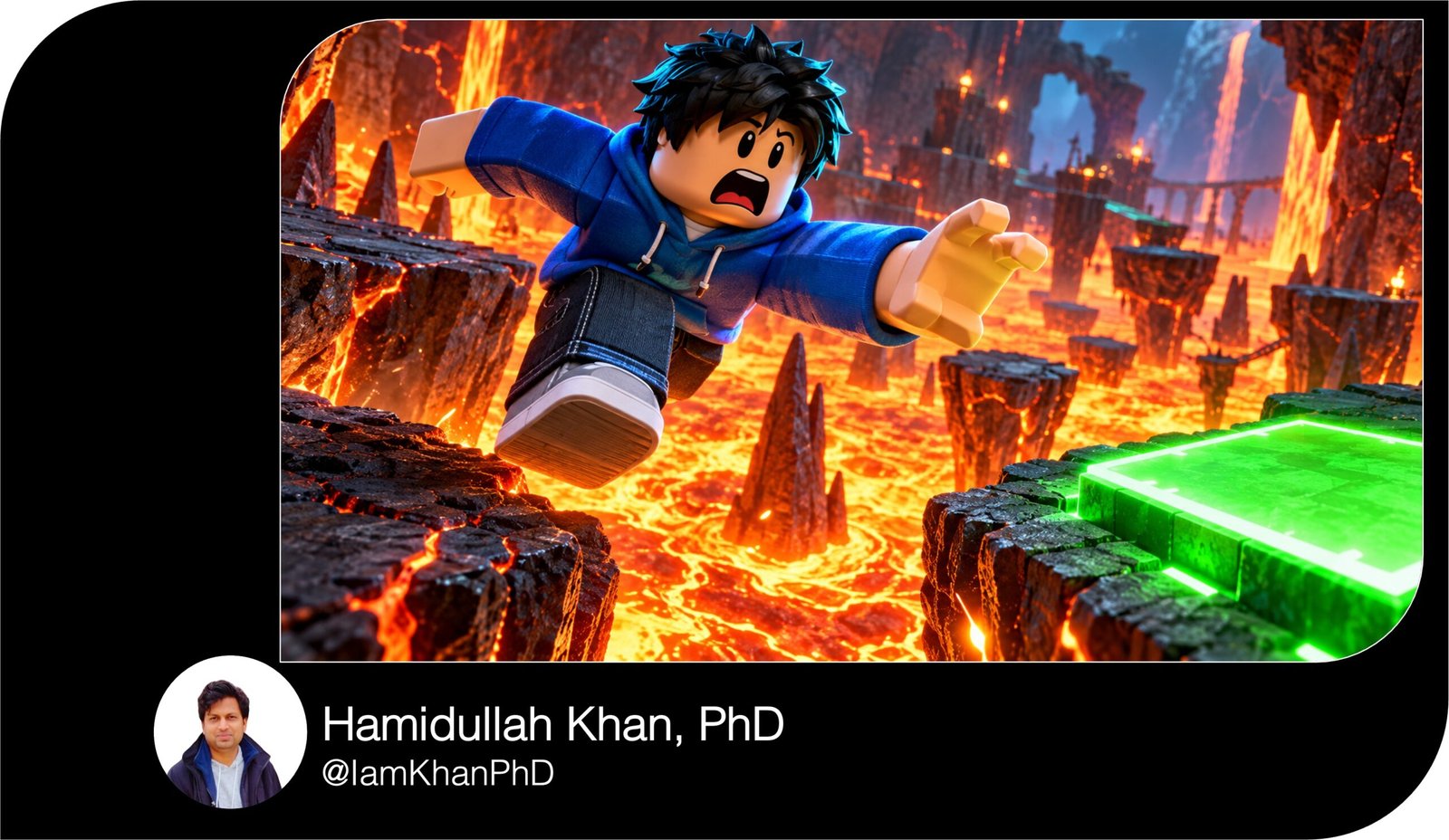
Create a dramatic Roblox-style gaming thumbnail in a horizontal 16:9 composition. Use recognizable block-shaped avatars, simple expressive faces, and polished 3D game lighting.
Show one main avatar wearing [PLAYER OUTFIT: a blue hoodie, black trousers, and white sneakers] jumping from a crumbling platform toward [SAFE PLATFORM: a small neon-green checkpoint]. Place the avatar slightly left of center, large enough for its face and pose to remain clear when the thumbnail is small. Give it a shocked expression, raised arms, and bent legs.
Below the avatar, show [HAZARD: a glowing orange lava pit] with a few bright sparks. Build the obstacle course diagonally from the lower-left foreground toward the upper-right background using [OBSTACLE: spinning lava platforms]. Make the next safe landing spot clearly visible to communicate the challenge immediately.
Use orange light from below and cool blue light around the avatar’s outline. Keep distant platforms softer and less detailed than the main character. Leave a dark, uncluttered area in the upper-right quarter for a headline. Keep the face away from the frame edges. Do not add text, logos, watermarks, or game interface elements.
Suggested headline: ONE LAST JUMP!
2. Horror Game: Something Is Behind You
Best for: Scary Roblox gameplay, monster encounters, and suspenseful escape videos.
Editable prompt:
Create a suspenseful Roblox-style horror thumbnail in horizontal 16:9 format, using block-shaped avatars and cinematic 3D lighting.
Place the main avatar wearing [PLAYER OUTFIT: a yellow jacket and dark jeans] in the lower-right foreground, shown from the waist up. The avatar is turning toward the viewer with [EXPRESSION: wide eyes and an open mouth] while holding [PROP: a small flashlight].
Behind the avatar, place [MONSTER: a tall shadow creature with glowing red eyes] at the far end of [LOCATION: an abandoned school corridor]. Make the creature’s silhouette readable against a faintly illuminated doorway. It should feel threatening without graphic violence or gore.
Aim the flashlight beam diagonally toward the monster, connecting the two subjects visually. Include only a few environmental details: [DETAILS: crooked lockers, a flickering ceiling light, and a partly open classroom door]. Use deep navy shadows, pale flashlight illumination, and a small red glow around the monster’s eyes.
Keep the avatar’s face bright and sharp. Leave the upper-left quarter dark and simple for a headline. Avoid excessive fog that hides the subjects. Do not generate text, watermarks, logos, or interface elements.
Suggested headline: DON’T LOOK BACK!
3. Tycoon Game: Starter Base to Dream Empire
Best for: Tycoon progression, base upgrades, and beginner-to-expert videos.
Editable prompt:
Create a Roblox-style tycoon thumbnail in a horizontal 16:9 layout with a clear before-and-after comparison.
Divide the scene into two contrasting halves. On the left, show [STARTER BASE: a tiny wooden shop with one production machine], using muted colors and simple surroundings. On the right, show [UPGRADED BASE: a huge futuristic factory with glowing conveyors and three tall towers], using bright, polished materials and warm lighting. Both bases should belong to the same [TYCOON THEME: robot-building business].
Place one main block-shaped avatar in the lower-center foreground, overlapping the dividing line. Dress it in [PLAYER OUTFIT: a red jacket, black trousers, and gold headphones]. Give it an excited expression, with one hand pointing toward the upgraded base.
Use a clean diagonal division between the two environments. Make the upgraded base visibly larger, but preserve enough detail on the starter side for the transformation to make sense. Add [UPGRADE DETAIL: a glowing golden production machine] as the main focal point on the right.
Leave a simple strip of sky across the top for a headline. Avoid tiny price labels, currency numbers, or unreadable signs. Do not add text, watermarks, logos, or interface elements.
Suggested headline: STARTER TO MEGA BASE
4. Pet Simulator: The Rare Hatch Reveal
Best for: Egg openings, rare pet discoveries, and collection videos.
Editable prompt:
Create a colorful Roblox-style pet-hatching thumbnail in horizontal 16:9 format, with one clear reveal as the main focus.
Place [RARE PET: a small crystal dragon with purple wings and golden eyes] in the center-right foreground, emerging from [EGG DESIGN: a large turquoise egg with gold star patterns]. Show two or three large shell pieces around its feet. Give the pet a friendly face, oversized eyes, and a distinctive silhouette that remains recognizable at small size.
Place a block-shaped avatar wearing [PLAYER OUTFIT: a white hoodie and purple headphones] on the left, leaning toward the pet with a delighted expression and hands raised.
Use [LOCATION: a bright fantasy meadow with rounded trees] as a softly blurred background. Add a concentrated golden glow behind the pet, plus a few sparkles around the broken egg. Keep the glow controlled so the pet’s eyes, wings, and outline stay sharp.
Use [COLOR PALETTE: purple, turquoise, and warm gold]. Make the pet more visually prominent than the avatar. Leave the upper-left area clear for a short headline. Do not add rarity percentages, invented game statistics, text, logos, watermarks, or interface elements.
Suggested headline: LOOK WHAT HATCHED!
5. Roleplay Game: The Dream House Reveal
Best for: House tours, roleplay stories, and mansion-building videos.
Editable prompt:
Create a Roblox-style roleplay thumbnail in a horizontal 16:9 composition featuring an exciting dream-house reveal.
Show [HOUSE STYLE: a modern two-story mansion with large windows, a rooftop terrace, and an outdoor pool] filling the middle and right side of the frame. Use a slightly low camera angle so the house looks impressive while keeping its full entrance visible.
Place the main block-shaped avatar wearing [PLAYER OUTFIT: a pink jacket, white trousers, and a small shoulder bag] in the lower-left foreground. Show the avatar smiling and holding [PROP: a large golden house key] toward the camera. The key should be clearly recognizable without covering the face.
Set the scene at [TIME OF DAY: sunset], with warm light glowing through the windows and soft pink-orange sky tones. Add [FEATURE DETAIL: a curved driveway with a turquoise sports car] near the entrance, but keep it smaller than the house and avatar.
Keep the architecture clean and readable, with a limited number of background buildings. Leave open sky in the upper-left corner for a headline. Do not add property prices, readable street signs, text, logos, watermarks, or interface elements.
Suggested headline: MY DREAM HOUSE!
6. Racing Game: The Final-Corner Overtake
Best for: Racing highlights, close finishes, and vehicle showcases.
Editable prompt:
Create a high-energy Roblox-style racing thumbnail in horizontal 16:9 format, showing a close overtake on a curved track.
Place [MAIN VEHICLE: a bright red sports car with black wheels and a white racing stripe] large in the lower-left foreground. Show it from a low front three-quarter angle, with its nose pointing toward the right side of the frame. Make the vehicle’s shape and front wheels sharp.
Place [RIVAL VEHICLE: a blue racing car] slightly behind it in the middle-right area. Separate the vehicles clearly so the viewer understands which car is ahead. If the driver is visible, use a block-shaped Roblox avatar wearing [DRIVER ACCESSORY: a black helmet with a gold visor].
Set the race in [TRACK LOCATION: a neon city circuit at night]. Use road markings and track barriers to lead the eye toward the cars. Apply motion blur to the background and road edges while keeping both vehicles readable. Add a few controlled tire sparks near the main car.
Use red highlights and blue-purple city lighting. Leave the upper-right area simple for a headline. Do not add speed readings, placement numbers, text, logos, watermarks, or interface elements.
Suggested headline: LAST-SECOND OVERTAKE!
7. Survival Game: One Tiny Safe Spot
Best for: Disaster-survival gameplay, flood challenges, and narrow escapes.
Editable prompt:
Create a dramatic Roblox-style survival thumbnail in a horizontal 16:9 layout, showing a player surrounded by a large environmental threat.
Place one block-shaped avatar wearing [PLAYER OUTFIT: an orange hoodie and dark cargo trousers] on [SAFE SPOT: the narrow roof of a small clock tower] in the center-right foreground. Show the avatar crouching with a worried face, one hand gripping the roof edge.
Surround the tower with [DISASTER: rapidly rising floodwater]. Show the waterline close enough to the roof to make the danger immediately understandable. Include [ENVIRONMENT DETAIL: partly submerged houses and a floating wooden crate] in the middle distance.
Use a slightly elevated camera angle so the small safe area and the scale of the flood are visible together. Add dark storm clouds behind the tower, with a break in the clouds casting light onto the avatar. Use cool blue-gray surroundings and a strong orange accent on the player.
Keep the avatar’s face and roof edge sharp. Avoid filling the scene with additional players or competing disasters. Leave the upper-left sky uncluttered for a headline. Do not add text, logos, watermarks, or interface elements.
Suggested headline: CAN I SURVIVE THIS?
8. Battle Game: The Boss Showdown
Best for: Boss battles, combat challenges, and team-action videos.
Editable prompt:
Create a Roblox-style action thumbnail in horizontal 16:9 format, with a clear face-off between one player and one powerful boss.
Place the main block-shaped avatar wearing [PLAYER OUTFIT: blue armor with white shoulder plates] in the lower-left foreground. Show the avatar in a confident battle stance, facing right and holding [WEAPON OR TOOL: a glowing cyan energy sword]. Keep the face visible and the weapon angled away from it.
Place [BOSS: a giant stone golem with glowing orange cracks] on the right, facing the player. Make the boss approximately three times the player’s visible height, with its upper body leaning forward and one fist raised.
Set the scene in [ARENA: a ruined circular temple with broken stone pillars]. Use a low camera angle and a clear gap between the characters to emphasize the confrontation. Add a small amount of dust near the boss’s feet and a controlled cyan glow around the player’s sword.
Use cool light on the player and warm light on the boss. Leave the upper-left background simple for a headline. Keep the action non-graphic. Do not add health bars, damage numbers, text, logos, watermarks, or interface elements.
Suggested headline: CAN I BEAT THIS BOSS?
9. Escape Game: The Guard Is Getting Closer
Best for: Prison escapes, chase sequences, and timed escape challenges.
Editable prompt:
Create a Roblox-style escape-game thumbnail in a horizontal 16:9 composition, capturing a tense chase with a clearly visible destination.
Place the main block-shaped avatar wearing [PLAYER OUTFIT: an orange prison jumpsuit and white sneakers] large in the lower-right foreground. Show the avatar running toward the viewer, body leaning forward, with a determined expression and one arm reaching ahead.
Behind the player, place [PURSUER: a block-shaped guard holding a flashlight] in the middle-left area. Make the guard smaller to establish distance, but keep its pose recognizable. Use the flashlight beam to point toward the escaping avatar.
Set the scene in [LOCATION: a prison maintenance corridor with exposed pipes]. Include [ESCAPE ROUTE: an open ventilation hatch glowing with cool daylight] near the right edge, ahead of the avatar. Make the route large enough to read immediately.
Use warm red alarm lighting behind the pursuer and cool blue light near the exit. Keep the avatar’s face brighter than the corridor. Leave the upper-center area simple for a headline. Do not add weapons, readable signs, text, logos, watermarks, or interface elements.
Suggested headline: THE EXIT IS SO CLOSE!
10. Game Update: The New World Reveal
Best for: Update announcements, new-map exploration, and feature showcases.
Editable prompt:
Create a Roblox-style game-update thumbnail in horizontal 16:9 format, focused on the discovery of one exciting new location.
Place a block-shaped avatar wearing [PLAYER OUTFIT: a black hoodie with cyan trim and silver headphones] in the lower-left foreground. Show the avatar in a three-quarter view, with its face visible, smiling and pointing toward [NEW FEATURE: a floating island with a crystal castle].
Make the new feature dominate the center-right area. Give it [DISTINCTIVE DETAILS: turquoise waterfalls, pink crystal towers, and a glowing bridge] so it feels specific and memorable. Show enough of the island’s outline for viewers to understand the location at a glance.
Set the scene in [WORLD SETTING: a bright sky above soft clouds]. Use a gentle wide-angle perspective and a clear visual path from the avatar’s pointing hand toward the castle entrance. Add a concentrated glow around [FOCAL DETAIL: the castle’s open golden doorway].
Use [COLOR PALETTE: cyan, pink, white, and gold]. Keep small background decorations to a minimum. Leave open sky in the upper-left quarter for a headline. Do not invent update dates or feature statistics. Do not add text, logos, watermarks, or interface elements.
Suggested headline: EXPLORE THE NEW WORLD!
About author








Add comment