
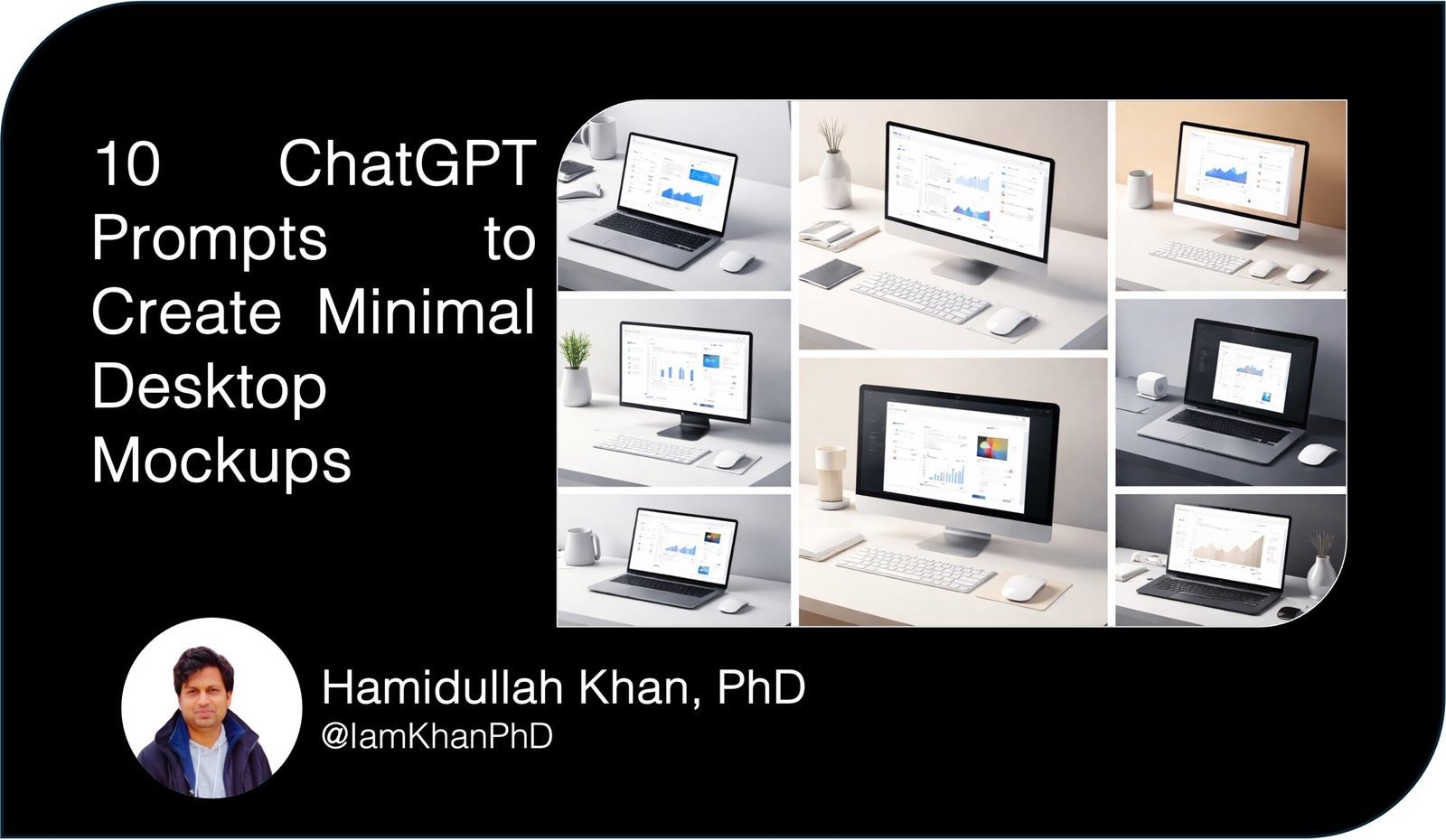
10 ChatGPT Prompts to Create Minimal Desktop Mockups
Minimal desktop mockups help your UI designs look polished, believable, and “launch-ready” without distracting props. The right prompt makes ChatGPT behave like a product photographer + art director + brand designer—so you can consistently generate clean, modern mockups for landing pages, app screenshots, portfolio posts, and social graphics.
What this prompt set will do
- Generate consistent, premium minimal desktop mockup concepts (not random scenes).
- Provide camera, lighting, shadows, and composition rules so results look professional.
- Output image-generator-ready prompt lines for fast creation.
- Include cropping + layout guidance for landing pages and social formats.
1) “Art Director” Prompt (universal mockup generator)
Prompt:
You are an award-winning product mockup art director. Create 6 minimal desktop mockup concepts for showcasing a digital UI screenshot.
Constraints:
– Style: minimal, premium, modern, clean
– Composition: desktop device (monitor or laptop) + subtle desk surface + optional single prop max
– Background: solid neutral or soft gradient (no patterns)
– Lighting: soft studio light, subtle shadow, no harsh reflections
– Color palette: choose 2–3 neutrals + 1 accent (provide hex codes)
– Output format: ready for a designer to produce or an image generator to renderFor each concept, provide:
1) Mockup name (short)
2) Scene description (1–2 sentences)
3) Camera angle + lens feel (e.g., straight-on, 3/4, slight top-down)
4) Device type (iMac-like monitor, MacBook-like laptop, generic desktop)
5) Desk + background materials (e.g., matte white desk, light concrete, warm beige)
6) Prop (optional) and why it’s included
7) Shadow direction + intensity
8) Suggested UI placement + safe margins
9) “Avoid list” (3 things that would ruin minimalism)
10) A single-line image-generation prompt version (no brand names, no copyrighted references)Ask me 2 quick questions only if absolutely required. Otherwise, proceed with sensible defaults.
2) “Brand-Matched Mockups” Prompt (align mockup with brand system)
Prompt:
Act as a brand designer and mockup stylist. I will paste my brand guidelines and a UI screenshot description. Your job is to design minimal desktop mockups that match the brand.
Brand info:
– Brand vibe keywords: [paste]
– Primary color(s): [paste hex]
– Neutrals: [paste hex]
– Typography vibe: [e.g., geometric sans, editorial serif]
– Audience: [paste]
– Product category: [paste]UI screenshot context:
– What’s shown on the screen: [paste]
– Mood I want: [confident, calm, bold, etc.]Deliver 5 mockup variations with:
– Scene description
– Palette choices (hex)
– Background treatment (solid/gradient)
– Device + angle
– Desk surface material
– One subtle brand cue (e.g., accent edge light, tiny color prop)
– Cropping specs for: 16:9 hero, 4:5 Instagram, 1:1, 9:16 story
– A “prompt-ready” version for an image generator (no brand names)Keep it minimal—no clutter, no busy textures, no multiple props.
3) “Screenshot-to-Mockup Blueprint” Prompt (turn any UI into a mockup plan)
Prompt:
You are a mockup production specialist. I have a desktop UI screenshot and want a minimal mockup plan that looks like a premium SaaS landing page.
UI screenshot details (describe it): [paste]
Target use: [landing page hero / case study / app store / social]
Preferred style: [Scandinavian minimal / monochrome / warm minimal / futuristic minimal]Create:
1) 3 scene directions (each with device angle, lighting, desk/backdrop)
2) For each direction: exact layout grid guidance (safe margins, whitespace ratios, where logo/headline could sit)
3) Suggested background colors (3 options with hex)
4) Shadow recipe (softness, direction, opacity description)
5) Export/crop checklist (desktop web + mobile social)
6) A final consolidated “single best” mockup directionNo fluff. Make it actionable.
4) “E-commerce Product Shot” Prompt (mockups that sell)
Prompt:
Act like a conversion-focused creative director. Create 5 minimal desktop mockups optimized for trust and clarity (like top-performing SaaS product pages).
Inputs:
– Product name: [paste]
– Target audience: [paste]
– Primary CTA: [paste]
– Screenshot shows: [paste]
– Brand accent color: [hex]Output each concept with:
– Title + goal (e.g., “clarity-first hero”)
– Scene description and why it increases conversions
– Composition rules (where the screen sits, whitespace, visual hierarchy)
– Color palette (hex)
– Do/don’t list
– A short image generator prompt
– Suggested headline and subheadline that visually matches the mockup style (optional but helpful)Keep backgrounds clean, props minimal, avoid gimmicks.
5) “Monochrome Minimal Set” Prompt (timeless, ultra-clean)
Prompt:
Generate 8 monochrome minimal desktop mockup setups. Rules:
– Only grayscale + one optional accent (one element only)
– Background: solid or very subtle gradient
– Desk: matte, no visible grain
– Lighting: soft, high-end studio
– Device: clean modern desktop monitor or laptopFor each setup:
– Name
– Scene description
– Camera angle
– Accent usage (if any)
– Best use-case (portfolio / landing / Twitter post / case study)
– 1-line image generator promptAvoid: plants, coffee mugs, messy stationery, noisy textures.
6) “Modern Warm Minimal” Prompt (friendly + premium)
Prompt:
You are a mockup stylist specializing in warm minimal aesthetics (soft beige, warm gray, gentle shadows). Create 6 desktop mockup concepts that feel approachable but premium.
Include for each:
– Warm neutral palette (hex)
– Background gradient direction (top-left to bottom-right etc.)
– Desk material suggestion (e.g., warm stone, matte sand)
– Lighting temperature description
– Device angle and distance
– One optional prop maximum (explain why)
– Image generator prompt lineGoal: calm, modern, “Apple-store clean” without using brand names.
7) “Futuristic Minimal” Prompt (tech-forward without clutter)
Prompt:
Create 5 futuristic minimal desktop mockups for a tech product. Must remain minimal.
Constraints:
– Dark or charcoal background with subtle light falloff
– Thin rim light on device edges
– Reflections very controlled (no mirror-like glare)
– One accent color onlyDeliver each with:
– Scene description
– Lighting setup (key light, rim light, shadow softness)
– Palette hex codes
– Best pairing UI style (bright UI vs dark UI)
– 1-line image generator prompt
– “Common mistakes” list (3 items)
8) “Step-by-Step Build” Prompt (for designers in Figma/Photoshop)
Prompt:
Act as a senior visual designer. Teach me how to build a minimal desktop mockup in a design tool (Figma/Photoshop) from scratch.
My constraints:
– Device type: [monitor/laptop]
– Output size: [e.g., 1920×1080]
– Style: [minimal, warm, monochrome, etc.]Provide:
1) Canvas + grid setup
2) Background recipe (solid/gradient, exact values)
3) Desk plane construction (shape, blur, opacity)
4) Device placement + perspective tips
5) Shadow recipes (primary + ambient)
6) Screen insertion steps (fit, warping, reflection/no reflection)
7) Final polish checklist (grain? vignette? sharpening?)
8) Export settings for web + socialKeep it clean. No extra props unless necessary.
9) “Batch Generator Prompt” (produce many variations fast)
Prompt:
You are a mockup generator. I want 20 minimal desktop mockup variations that are consistent in style but varied in composition.
Global style:
– Background: [neutral solid or subtle gradient]
– Desk: [matte white / concrete / warm beige]
– Lighting: [soft studio]
– Prop rule: max 1 prop, used in only 30% of variantsReturn a table with columns:
Variant # | Angle | Device | Background | Desk material | Prop (optional) | Shadow direction | Best use-case | 1-line image promptMake the variations meaningfully different while staying minimal and coherent.
10) “Social-First Mockups for X/Twitter” Prompt (scroll-stopping)
Prompt:
Act as a social creative director for X/Twitter. Create 7 minimal desktop mockup layouts designed to stop the scroll on a timeline.
Constraints:
– Must read well at small sizes on mobile
– Strong silhouette of device
– High contrast between screen and background
– Lots of negative space for overlay textFor each layout:
– Composition description (where the device sits and how big)
– Background color options (hex)
– Recommended overlay text placement (top-left, center, etc.)
– 1-line image generator prompt
– Suggested post headline (max 8 words)No clutter. No stock-photo vibe.
How to use this prompt set
- Pick one prompt based on your goal (brand match, monochrome, social-first, etc.).
- Replace the brackets like [paste] with your product + screenshot description.
- Run it once, then say: “Give me 10 more variations in the same style.”
- If using an image generator, paste the 1-line prompt and iterate with: “Less props, softer shadows, more negative space.”
Tips to get the best results
- Describe your UI with 3 specifics: layout type, dominant colors, and key elements (charts/forms/nav).
- Use constraints like “one prop max” and “no texture grain” to prevent clutter.
- Ask for hex palettes + shadow direction to keep mockups consistent across a series.
- Iterate intentionally: change only one variable per run (angle OR background OR lighting).
About author



Add comment